Identifying devices on the network.
IP addresses, gateways, and discovering devices connected to your own network.
TL;DR Too lazy to read? Click here.
Have you ever been curious about listing the devices connected to your network?
Requirements
To list them, we need to use nmap:
sudo apt-get install nmapDefault Gateway
We need the address of the default gateway. If you do not know your default gateway, simply type:
route -n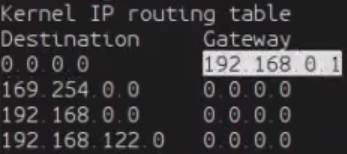
On the first line, it lists the default gateway.
In this example: 192.168.0.1
Using nmap
With the default gateway in hand, we can use nmap!
Using the command:
nmap -sP (seuGatewayPadrao)/24Your terminal will then return a list of all the IPs connected to your network :)